
Overview
What is Emque: Emque is a construction ERP system for commercial construction contractors, founded in 1978. Its Perfect Project platform delivers fully integrated, cost-effective modules for accounting, job costing, payroll, estimating, purchasing, service orders, and project management, built on disciplined accounting practices.
How to integrate Emque with Datagrid
This setup uses a direct database connection to the Perfect Project database, intended for project teams who manage Emque accounting, job costing, and payroll data. The steps below cover how to enter connection details, verify authentication, and review the documented data access scope, in that order.
Setup time: ~1 minute
Requirements:
Active Emque (Perfect Project) service with database access
Supported web browser (Safari, Chrome, Edge, or Firefox)
Datagrid account
Enter connection details
Sign in to your Datagrid account and open your Workflow.
Click Integrations in the left side panel.
Scroll to the Construction & BIM header and click Setup Integration under Emque.
Click Create a Connection.
Fill in your Emque database credentials across all six required fields:
Connector Name: A label you choose for this connection
Server: Your database server address
Port: The database port number
Database: The database name
Username: Your database username
Password: Your database password
The required fields fit this structure:
connector_name: "Perfect Project - Production"
server: "your-database-server"
port: "your-database-port"
database: "your-database-name"
username: "your-database-username"
password: "your-database-password"
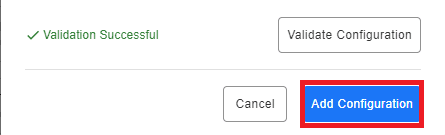
Click Validate Configuration. If the information entered is valid, a "Validation Successful" message appears. Valid fields highlight green, and invalid fields highlight red.

Click Add Configuration to finalize and save the connection.
Verify authentication
The Emque connector uses direct database credentials with a username and password. No OAuth, API key, or token-based authentication is available. Your Emque database server must be network-accessible from Datagrid, which may require firewall configuration on your side.
Review data access scope
Because the connector operates through a direct database connection, Datagrid can query data across Perfect Project modules depending on the available schema and permissions, including accounting, job costing, payroll, estimating, purchasing, service orders, and project management. Write-back, sync direction, and sync frequency are not specified in the current connector documentation.
These steps cover the documented setup flow for connecting Emque to Datagrid. For deeper schema or product detail, contact Emque directly.
Why use Emque with Datagrid
Project teams running financial and project workflows in Perfect Project can use Datagrid to execute analysis and reporting without relying on manual exports.
Direct access through one connection: A single database connection provides a path into Perfect Project data for project teams without requiring multiple integration points or middleware.
Cross-module analysis potential: Datagrid's AI agents can combine payroll records with job cost entries, or match estimates against actuals, within a single workflow when the underlying schema supports it.
Automated cost variance detection: Datagrid's AI agents compare budgeted versus actual costs per job code and flag overruns through team notifications, giving project managers earlier visibility into margin risk.
Historical project intelligence: Operations teams can bulk-extract years of project records and build a queryable knowledge base that returns narrative answers to natural-language questions from project managers.
No API dependency: The direct database architecture bypasses the need for REST endpoints or token management, simplifying connectivity for legacy systems like Perfect Project.
What you can build with Emque Datagrid integration
Once Datagrid connects to Perfect Project, project teams can execute repeatable workflows across accounting, job costing, payroll, estimating, and reporting. The workflows below center on records already stored in Perfect Project and route the output into Datagrid-driven reporting and follow-up actions:
Job cost analytics pipeline: Datagrid extracts job costing and general ledger records from Perfect Project, transforms them within its workflow engine, and loads cost performance outputs to downstream analytics or reporting tools, so project owners can monitor profit margins across active jobs without manual report generation.
Labor cost monitoring with automated alerts: Datagrid's AI agents pull payroll records and join them with job costing data. When labor costs exceed budgeted thresholds for a specific cost code, the agent triggers a notification to the responsible project manager.
Estimating vs. actuals variance reports: Datagrid queries both the estimating module and the job costing module, calculates variance per job and cost code, and generates automated reports. An AI agent evaluates deviations against configurable thresholds and triggers notifications for overruns.
AI-powered historical project Q&A: Bulk-extract historical records from project management, job costing, payroll, and purchasing modules into a Datagrid knowledge base. Project managers submit natural-language questions and receive data-backed narrative answers, along with scheduled summary reports distributed via email.
Resources and documentation
Emque integrated software overview, detailing accounting, job costing, payroll, and purchasing capabilities
Emque customer support page, with support contact information for schema and product questions
Frequently asked questions
Where is the Emque connector located inside Datagrid?
Open your Workflow in Datagrid, click Integrations in the left side panel, then scroll to the Construction & BIM header. Click Setup Integration under Emque.
What credentials does the Emque connector require?
Six fields are required, and none are optional: Connector Name, Server, Port, Database, Username, and Password. These are direct database credentials for your Perfect Project installation.
Does the Emque connector use OAuth or API keys for authentication?
No. The Datagrid connector uses a direct database connection with username and password credentials. There is no OAuth or API key option available.
Which Perfect Project data objects can Datagrid access?
The connector page does not list specific tables or entities. Because the connector operates at the database level, project teams can work with data across Perfect Project modules such as accounting, job costing, payroll, estimating, purchasing, service orders, and project management, depending on schema access and permissions. For specific schema details, contact Emque directly at support@emque.com, as noted on the Emque customer support page.
How do I verify that my Emque connection is working?
After entering your credentials, click Validate Configuration. A "Validation Successful" message confirms the connection. Invalid fields highlight red, and valid fields highlight green. Once validated, click Add Configuration to finalize.
Similar integrations
Procore: Integrates project management and field data with Emque's accounting and job-costing records for end-to-end built-world workflows.
Oracle Primavera Cloud (OPC): Links scheduling and resource plans with Emque financials to analyze project schedule versus cost performance.
PlanGrid: Connects sheet and drawing updates to Emque's job costing and payroll for synchronized field-to-office cost tracking.
BIM 360 Build: Feeds RFIs, issues, and forms into Emque-based reporting to reconcile field events with project costs and invoices.
Sage 300 Cloud: Pairs accounting and payroll data from Emque with Sage 300 Cloud for advanced financial reporting and reconciliation.
Acumatica: Combines Emque job costing and purchasing data with Acumatica ERP for multi-system financial consolidation and analytics.
Browse Categories
Construction
ERP