
Overview
What is Sentry: Sentry is an application monitoring and error tracking platform built for software developers. It captures, groups, and contextualizes errors with stack traces, breadcrumbs, suspect commits, and release context across 100+ programming languages. Sentry also provides distributed tracing, session replay, release health monitoring, and performance profiling, all correlated through a single trace.
How to integrate Sentry with Datagrid
Engineering leads and project teams use this integration to pull Sentry data into Datagrid on a recurring schedule, then route analysis and reporting work to Datagrid AI agents. Before you start, confirm access to the right Sentry projects and data, generate a personal access token, create the connection in Datagrid, and choose the sync schedule that fits your reporting workflow.
Create the connection
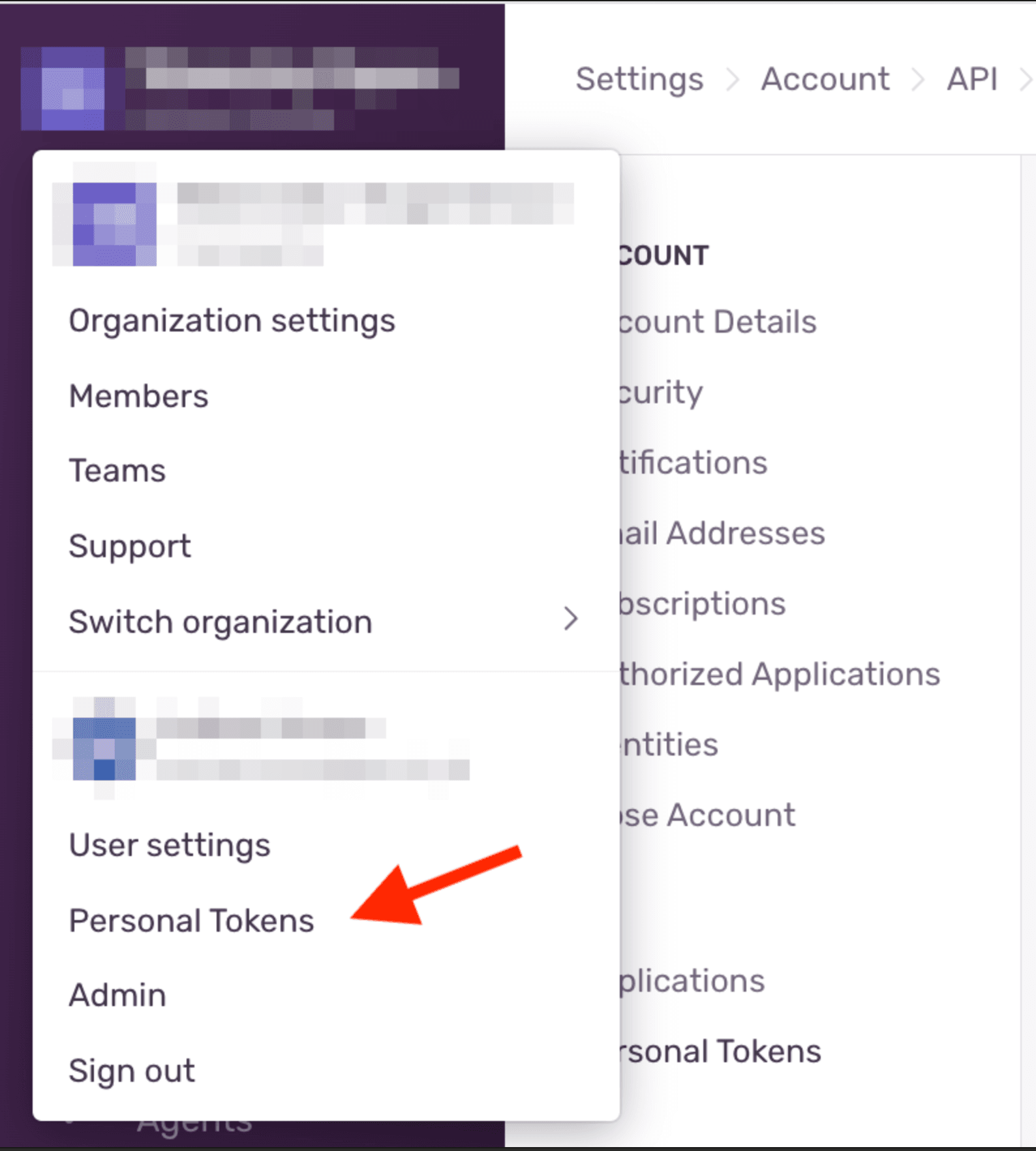
Before starting, confirm that you have an active Sentry account with permissions to access the target projects and data, a Sentry API key (Personal Access Token) generated from your Sentry account settings under Auth Tokens, and a list of the specific data objects you want to import.
Follow these steps to create the integration in Datagrid:
Click + Create on the top-left of the Datagrid screen
Select Connect Apps
Search for the Sentry integration
Log in with your Sentry account and authorize Datagrid access if prompted
Click Next
Select the Sentry data objects to include in your dataset, such as Issues, Events, and Projects
Click Start First Import to begin syncing
Authenticate with a personal access token
The integration authenticates with a Sentry Personal Access Token. The token inherits the creating user's permissions and cannot exceed them, and Sentry recommends generating a separate auth token per use case. Pass the token in the standard Authorization header on every request, as shown below:
-H 'Authorization: Bearer {TOKEN}'
Set the recurring schedule
After the first import, set the sync cadence that matches your reporting workflow:
Open the left side panel and click on your Sentry dataset
Click ... in the top-right of the dataset
Click Edit Pipeline
Click the Schedule button beside the Import Configuration button
Set the frequency to daily, weekly, or monthly
Specify the time of day and any downtime periods
Click Update to save
Review data sync details
Use the following reference to confirm how the integration behaves once it is running:
Direction: One-way (Sentry to Datagrid)
Frequency: Daily, weekly, or monthly
Data objects: Issues, Events, Projects, Organizations, Releases, Users, Tags, Errors, Performance Monitoring Data, Dashboards
Format: JSON via Sentry REST API
With access confirmed, your token generated, data objects selected, and the import schedule set, the integration is ready to run. But if you need an endpoint not listed here? Contact support@datagrid.com to request additional data objects.
Why use Sentry with Datagrid
This integration gives project teams and engineering leads a scheduled flow of Sentry data into Datagrid, where Datagrid AI agents analyze issues, compare changes across releases, and generate reports.
Automated error trend analysis: Datagrid AI agents process imported Sentry issues and events to identify recurring patterns, group related errors, and surface trends without manual spreadsheet work.
Cross-platform data correlation: Engineering teams can combine Sentry error data with project files or data from other connected systems inside a single Datagrid dataset.
Scheduled imports: Datagrid's daily, weekly, or monthly sync cadence keeps Sentry data current inside Datagrid on a predictable schedule that fits sprint and reporting cycles.
Release regression detection: Datagrid AI agents compare Sentry release health data against prior release baselines to flag adoption drops or crash-rate spikes when new data arrives.
User impact prioritization: Datagrid AI agents rank issues by affected user count, error frequency, and environment, then generate prioritized triage summaries for your engineering team.
Reusable dashboards and reports: Project teams can build interactive visualizations from Sentry data in Datagrid, then embed those reports back into other connected systems for visibility across the organization.
What you can build with Sentry Datagrid integration
Once Sentry data lands in Datagrid, teams can turn issue streams, performance records, and release history into recurring workflows that produce analysis instead of manual follow-up. Here's what you can build with the integration:
Automated release quality reports: Engineering leads can import Sentry release data alongside deployment records from a CI/CD pipeline, and Datagrid AI agents generate a per-release quality summary covering crash-free rates, regressions, and top issues introduced.
Cross-project error pattern detection: Platform teams can pull Issues and Events from multiple Sentry projects into a single Datagrid dataset, where Datagrid AI agents cluster related errors across services to surface shared root causes that single-project views miss.
User impact triage pipeline: Support and engineering teams can import Sentry Users, Issues, and Tags data into Datagrid, where Datagrid AI agents correlate error frequency with affected user segments such as browser, OS, and environment, then generate a prioritized triage list ranked by business impact.
Performance degradation alerts with context: SREs and product engineering teams can combine Sentry Performance Monitoring Data with application usage data from analytics tools, so Datagrid AI agents flag latency regressions alongside the user behavior and traffic patterns that explain them.
Resources and documentation
Sentry API reference: Full REST API documentation covering all entity endpoints, query parameters, and response schemas
Sentry auth token creation tutorial: Step-by-step walkthrough for generating Personal Access Tokens and Internal Integration tokens
Sentry API permissions and scopes reference: Full scope list with required permission levels per resource type
Frequently asked questions
What data objects can I import from Sentry into Datagrid?
The integration supports the data objects listed in the Review data sync details section above. If you need an endpoint not currently available, Datagrid accepts requests at support@datagrid.com.
What type of authentication does the Sentry integration use?
The integration uses a Sentry Personal Access Token. Generate one from your Sentry account settings under Auth Tokens using the Sentry auth token creation tutorial or the Sentry Personal Access Token reference. The token is passed via the Authorization: Bearer {TOKEN} header.
How fresh is the Sentry data inside Datagrid?
Data freshness depends on your configured schedule. Datagrid supports daily, weekly, or monthly imports from Sentry. A daily schedule means data could be up to 24 hours old.
What Sentry permissions do I need to set up the integration?
You need an active Sentry account with access to the projects and data you want to import. For read-only data extraction, assign scopes like event:read, project:read, and org:read, following the Sentry API permissions and scopes reference.
Can I combine Sentry data with other tools in Datagrid?
Yes. Once Sentry data is in a Datagrid dataset, Datagrid AI agents can cross-reference it with data from any other connected source. Datagrid integrates with 100+ platforms across developer tools, databases, and collaboration apps.
Similar integrations
GitHub: Correlate Sentry issues and suspect commits with GitHub repository data to automate release regression analysis and PR-linked triage workflows.
GitLab: Link Sentry error and release data to GitLab commits, CI/CD pipelines, and merge requests for automated triage and autofix workflows.
Jira: Sync Sentry issue alerts into Jira tickets for structured incident tracking, prioritization, and developer assignment.
PagerDuty: Forward prioritized Sentry alerts into PagerDuty schedules so on-call engineers receive routed incidents with full error context.
Datadog: Combine Sentry error telemetry with Datadog infrastructure metrics to investigate incidents across application and system layers in one dataset.
Slack: Forward Sentry alerts and Datagrid summaries into Slack channels to notify teams and attach contextual links for fast investigation.
Browse by category
Developer and utility tools
Communication and collaboration
Work management and productivity